
انتقلنا من مرحلة ‘دعم’ الذكاء الاصطناعي إلى مرحلة ‘التكامل الكامل’. تعرف على أفضل أجهزة AI PCs لعام 2026 وكيف تعيد تعريف مفهوم الحوسبة الشخصية.

CLOCK
OUTLINE • Clock Distribution Diagram • Signal Description •• RReeppaaiirr FFllooww CChhaarrtt • Repair Technique CLOCK Distribution Diagram P5Q Deluxe MCHHCLK/# 200/266MHZ Intel M_CHB_CLK/# CK_100M_MCH/# 100MHZ BearLake DDR2 1,2,3,4 CCPPUUHHCCLLKK CCKK_9966MM_DDRREEFF//## 9966MMHHZZ GMCH 200/266/333MHZ CK_100M_ICH/# 100MHZ Intel LGA775 CCKK_110000MM_SSAATTAA//## 110000MMHHZZ BITCLK 24MHZ CK_33M_ICH/# 33MHZ Intel AUDIO Code CK_48M_USB/# 48MHZ CClloocckk IICCHH99 Chip CK_14M_ICH/# 14.318MHZ CK_33MHZ
Case Analysis
Sephiroth Kwon GGRRMMAA 20-05-2009 OUTLINE • “all dots” • “00” All dots • What is the “all dots”? “AAllll ddoottss” mmeeaannss tthhaatt tthheerree iiss oonnllyy ppoowweerr ssuupppplliieedd ttoo DEBUG CARD, but no RESET# or CLK signals. All the LEDs will dispplayy “dot”. The pproblems should be: – We call it as “no frequency, no reset”.
ACTRE (ASUS Certificate Training of Repair Engineer)
Handheld System Level 2-3 Trouble shooting Statement of Confidentiality All recipients of this document must treat this training material as ASUS confidential and must not disclose it to any party other than the recipients’ employees on a need to know basis, or other individuals authorized under a written Confidential Disclosure Agreement signed by ASUS and

ACTRE (ASUS Certificate Training of Repair Engineer)
Handheld System Level 2 Hardware Skill Statement of Confidentiality All recipients of this document must treat this training material as ASUS confidential and must not disclose it to any party other than the recipients’ employees on a need to know basis, or other individuals authorized under a written Confidential Disclosure Agreement signed by ASUS and
ACTRE (ASUS Certificate Training of Repair Engineer)
Handheld system training Level2 Basic Skill Statement of Confidentiality All recipients of this document must treat this training material as ASUS confidential and must not disclose it to any party other than the recipients’ employees on a need to know basis, or other individuals authorized under a written Confidential Disclosure Agreement signed by ASUS and
ACTRE (ASUS Certificate Training of Repair Engineer)
Handheld system training Level1 Training material Statement of Confidentiality All recipients of this document must treat this training material as ASUS confidential and must not disclose it to any party other than the recipients’ employees on a need to know basis, or other individuals authorized under a written Confidential Disclosure Agreement signed by ASUS and
Bölüm I:
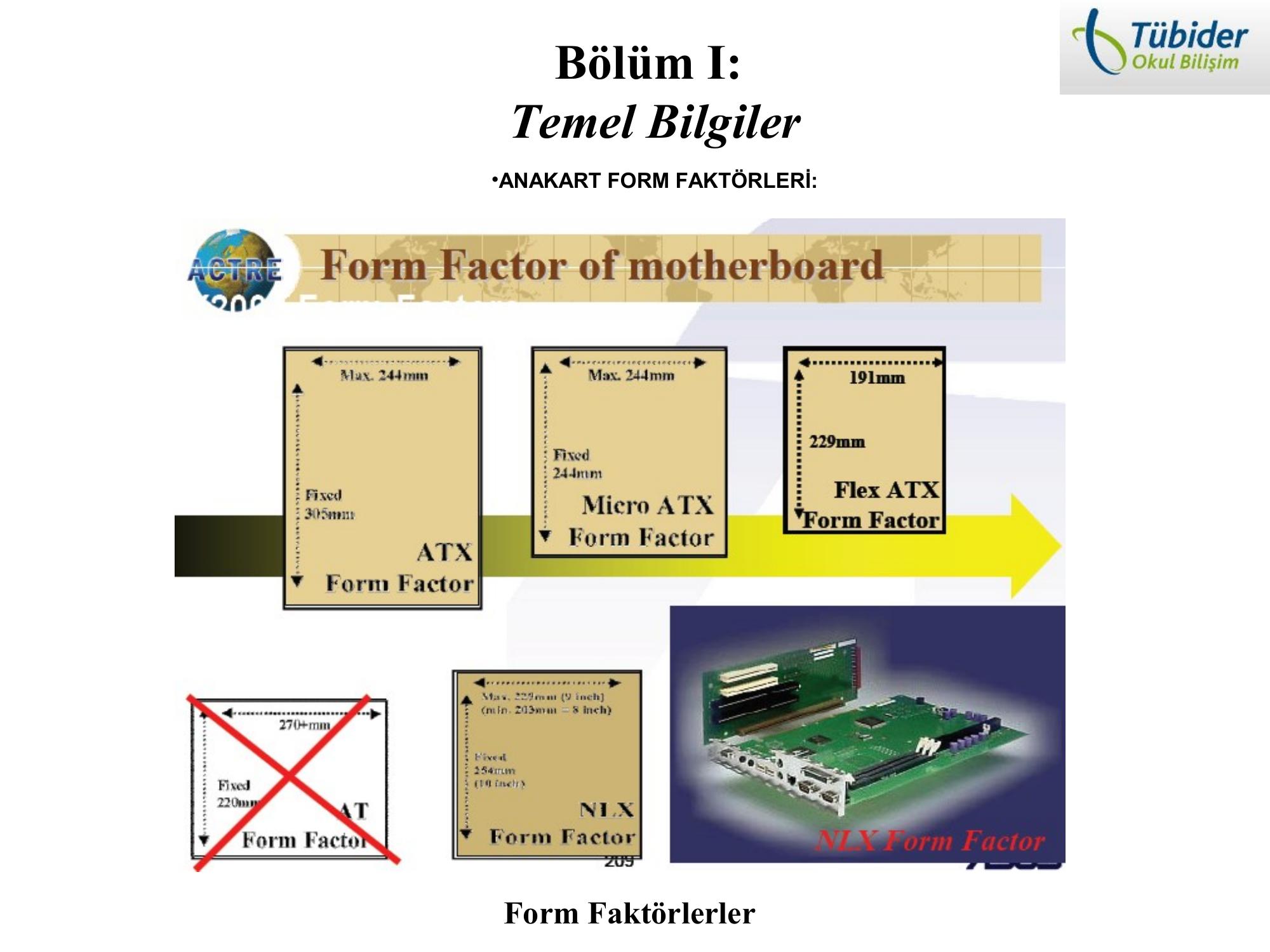
Temel Bilgiler •ANAKART FORM FAKTÖRLERİ: Form Faktörlerler •Anakartın form faktör bilgisi anakartın yapısı hakkında bilgi verir. •Anakartlar için standardize edilmiş bazı form faktör standartları mevcuttur : Baby-AT, ATX, M-ATX, Flex-ATX, BTX, NLX vs. gibi. * Bu standartlar’ın bazıların kullanımı zamanla terkedilmiştir. Günümüzde anakartlar üzerinde çok yaygın olmakla birlikte ATX, micro-ATX standardı kullanılmaktadır. ATX Standartındaki Bir
Audio
Sephiroth Kwon GGRRMMAA 26-05-2009 AUDIO South Audio Bridge codec 5-pin serial data transaction : BIT_CLK, SYNC, RESET, SSDDAATTAA_IINN, SSDDAATTAA_OOUUTT South Bridge Audio codec Audio Bus Azalia AC’97 AUDIO(Azalia) Signals Description AUDIO(Azalia) Signals Description AUDIO(Azalia) Signals Description AUDIO(Azalia) Signals Description AUDIO(Azalia) Signals Description Repair Flow Chart START VViissuuaall IInnssppeeccttiioonn ffiixx aannyy ttrraaccee oorr ddaammaaggeedd OK check