
(FIX) SQL Server error Login failed for user ‘sa’ Error: 18456, Severity: 14, State: 8 crystal report
 it
it
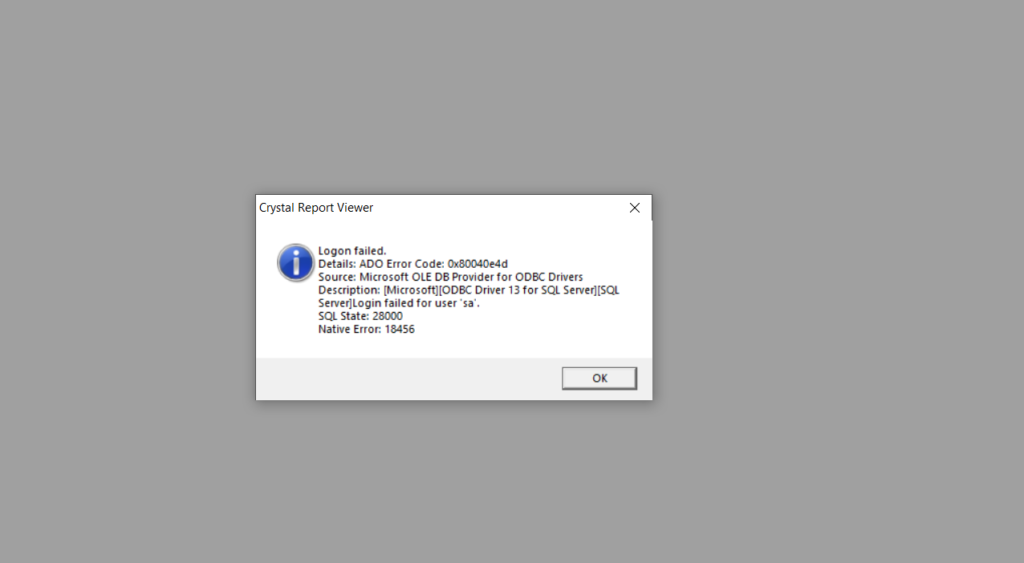
SQL Server error Login failed for user ‘sa’ Error: 18456, Severity: 14, State: 8 crystal report
Microsoft ODBC Driver 13 for SQL Server : Login failed for user ‘sa’
SQLSTATE[28000]: [Microsoft][ODBC Driver 13 for SQL Server][SQL Server]Login failed for user ‘sa’.
Explanation
When a connection attempt is rejected because of an authentication failure that involves a bad password or user name, a message similar to the following is returned to the client: “Login failed for user ‘<user_name>’. (Microsoft SQL Server, Error: 18456)”.
Additional information returned to the client includes the following:
“Login failed for user ‘<user_name>’. (.Net SqlClient Data Provider)”
——————————
“Server Name: <computer_name>”
“Error Number: 18456”
“Severity: 14”
“State: 1”
“Line Number: 65536”
The following message might also be returned:
“Msg 18456, Level 14, State 1, Server <computer_name>, Line 1”
“Login failed for user ‘<user_name>’.”
| State | Description |
|---|---|
| 1 | Error information is not available. This state usually means you do not have permission to receive the error details. Contact your SQL Server administrator for more information. |
| 2 | User ID is not valid. |
| 5 | User ID is not valid. |
| 6 | An attempt was made to use a Windows login name with SQL Server Authentication. |
| 7 | Login is disabled, and the password is incorrect. |
| 8 | The password is incorrect. |
| 9 | Password is not valid. |
| 11 | Login is valid, but server access failed. One possible cause of this error is when the Windows user has access to SQL Server as a member of the local administrators group, but Windows is not providing administrator credentials. To connect, start the connecting program using the Run as administrator option, and then add the Windows user to SQL Server as a specific login. |
| 12 | Login is valid login, but server access failed. |
| 18 | Password must be changed. |
| 38, 46 | Could not find database requested by user. |
| 58 | When SQL Server is set to use Windows Authentication only, and a client attempts to log in using SQL authentication. Another cause is when SIDs do not match. |
| 102 – 111 | AAD failure. |
| 122 – 124 | Failure due to empty user name or password. |
| 126 | Database requested by user does not exist. |
| 132 – 133 | AAD failure. |
Fix Problem
This Problem is Because the Connection is Not Trust ODBC DSN
Run
Regedit
Search (Database Name)
Computer\HKEY_CURRENT_USER\SOFTWARE\ODBC\ODBC.INI\
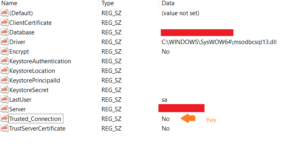
Trusted_Connection No To —-> Yes
Trusted_Connection : Yes
Done 🙂
